


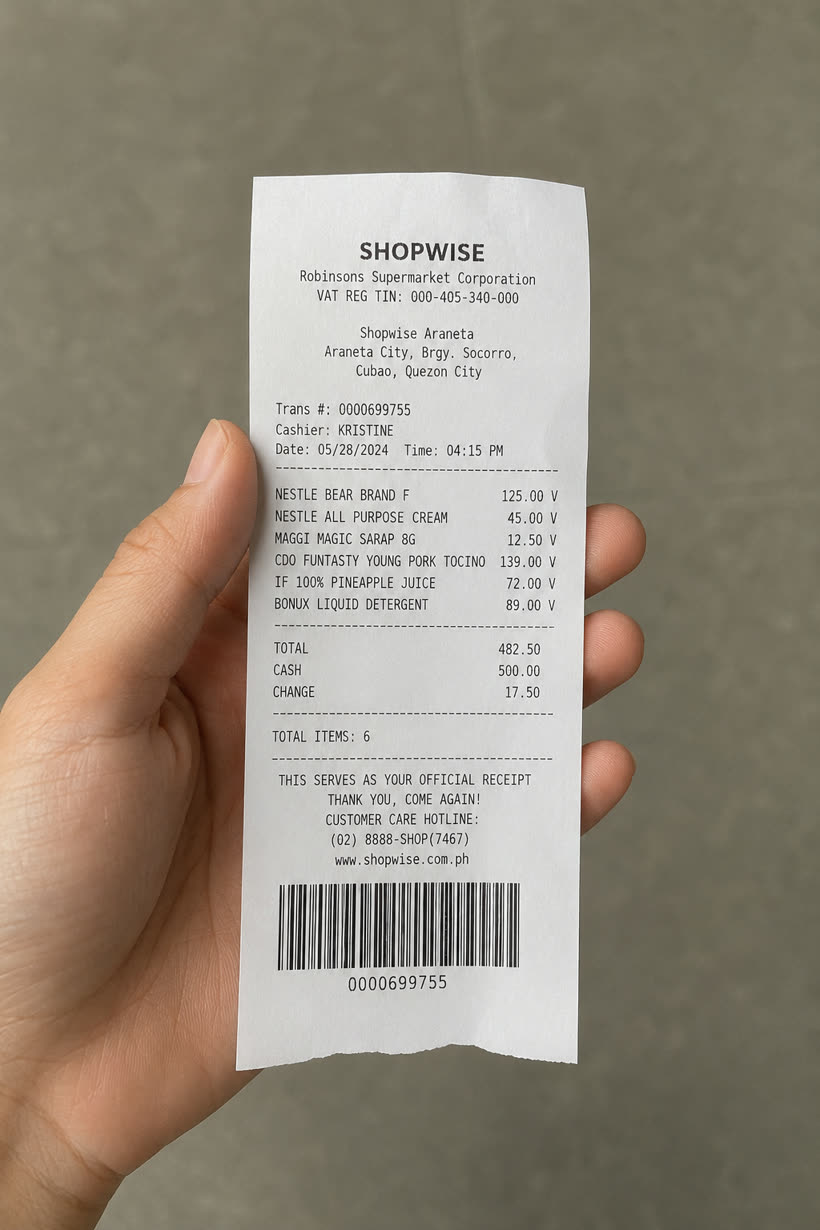
Share or scan
Two ways to earn
Share from any wallet app, or snap the printed receipt. GCash, Maya, GrabPay, bank apps and PDFs all work, and a screenshot from your gallery counts just the same.
Pay digitally the way you always do. Share the receipt with Paldo and the points are yours.
Upload a Receipt
Open any e-wallet and tap share to ‘Paldo’ on your digital receipt
Scan Physical Receipt
Snap or upload a photo of the physical receipt
Send your e-wallet receipt and the printed receipt. Paldo matches them when both arrive.
The first is saved right away, so you can go find the other whenever.

 252
252SCAN,
PLAY
WIN.
Every receipt you scan is a chance to win prizes in just three easy steps.
DAILY CHECK-IN
Come back tomorrow for more
 4-day streak
Double points, first week
Lands on your first claim that passes+500
Submit your first proof
You’ll need two: your payment and the store receipt. Start with whichever you have.
Upload a Receipt
Open any e-wallet and tap share to ‘Paldo’ on your digital receipt
Scan Physical Receipt
Snap or upload a photo of the physical receipt

1 Point
for every peso you spend
Every peso on your receipt counts

50 Points
the moment you join
A welcome gift when you join
2 Receipts
to earn points
Your e-wallet receipt plus the printed one
You already pay for things. Paldo turns the receipts you get anyway into points.
GCash, Maya, GrabPay, a bank app, or any digital wallet you already use. Paldo doesn’t handle your money or see your payment, so nothing about paying changes.
Your e-wallet receipt, and the printed receipt from the store. Send either one first.
Paldo compares the amount, the time, the reference number and the store name. When the two agree, your points land.
Brew & Co.
ECash · 02 Aug 2026 · 1:48 PM
CLAIM PROGRESS · 1 OF 2
Something looks wrong? Report an issue
See how it works, start to finish.
Paldo isn’t part of this step. No special QR code, no extra checkout.
Share your e-wallet receipt, or snap the printed one. Whichever is on hand.
Share it from your e-wallet, or use a screenshot you already have. Both work.
Just point your camera. Long receipt? Take up to 4 photos. We save each one right away, so there’s no rush.
We compare the two. If they match, your points are added.
Your wallet app
Payment sent
₱ 385.00
Paldo isn’t part of this step. No special QR code, no extra checkout.
Your wallet app
Payment sent
₱ 385.00
Share your e-wallet receipt, or snap the printed one. Whichever is on hand.
252SCAN,
PLAY
WIN.
Every receipt you scan is a chance to win prizes in just three easy steps.
DAILY CHECK-IN
Come back tomorrow for more
4-day streakDouble points, first week
Lands on your first claim that passes+500Submit your first proof
You’ll need two: your payment and the store receipt. Start with whichever you have.
Upload a Receipt
Open any e-wallet and tap share to ‘Paldo’ on your digital receipt
Scan Physical Receipt
Snap or upload a photo of the physical receipt
Share it from your e-wallet, or use a screenshot you already have. Both work.
Add the e-wallet receipt
Pick the receipt from your photos. That finishes this claim.
Upload a screenshot
Pick the receipt screenshot from your photos.
Just point your camera. Long receipt? Take up to 4 photos. We save each one right away, so there’s no rush.
We compare the two. If they match, your points are added.

+385
1,625Everything here works right now.
Share from any wallet app, or snap the printed receipt. GCash, Maya, GrabPay, bank apps and PDFs all work, and a screenshot from your gallery counts just the same.
Every peso on your receipt earns a point. New accounts get 50 points to start.
Stopped halfway? We save your progress. Pick it up later, even on another phone.
Use your points on Paldo Slots and Match the Pairs. Every result is random and fair.
Paldo has not launched, so it has no testimonials yet. These are placeholders showing the layout.
What Paldo touches, what it reads, and what a point is worth.
Pay the way you already do. Paldo handles the rest.
Get the app now